Blog

Personal and Collective Responsibility

When I first started my own switch to a Linux based operating system for my general daily computing needs, which was about seven years ago, I experimented with a few different popular “distributions”. For those who are not familiar with the word “distributions” in regards to Linux based systems, it basically means a collection of all the needed software required for a fully functional computer operating system.

These days there are some hundreds of such distributions, with one of the most popular being Ubuntu (on which many other distributions are based, such as Linux Mint, elementary OS, and many more). After a few months of experimentation I settled on a distribution based on Ubuntu. A significant part of my choice is the excellent Launchpad service, where many “PPAs” (personal package archives) usable by Ubuntu based systems are found.

Launchpad and all the PPAs there gives users of Ubuntu based systems a much more flexible and dynamic way to build their operating system than in many cases with other Linux based systems. This was very attractive to me as someone who likes to “hack and change” his system in custom ways. So the whole matter of PPAs is key to why I settled on choosing Ubuntu based systems for my daily computing.

In the months after settling on Ubuntu based systems I experimented with a variety of PPAs offered by a variety of people. Regardless of where I saw links to whichever person’s PPA(s), whether it was on some tech blog or some support site or wherever else, I always made sure to first do each of the following two things in every case, relative to every person’s PPA(s) that I was investigating:

1) Read the person’s main Launchpad page (for instance, my main page is at https://launchpad.net/~savoury1) to find out more about them, what they have to say about their work, and thus make a determination if I should trust them at all with software that will be installed directly onto my own personal computer from their PPA(s).

2) Read the specific information on the page(s) of the specific PPA(s) that I am considering possibly using from that person (for instance, my FFmpeg PPA page is https://launchpad.net/~savoury1/+archive/ubuntu/ffmpeg4), to see what additional information and/or technical instructions they might themselves give about their PPA(s) for any of their users.

As stated, I did the above two actions in each and every case, and never added any PPA just because some tech blog article said “it’s great” and gave me a “five second” solution for adding it into my personal system. Doing the above two steps are demonstrative of taking self-responsibility with one’s own computer, specifically in regards to adding PPAs.

Those two steps are key to the decision of trusting the person in question, and also show basic respect for the person doing the work. Bothering to actually read the words of the maintainer of whatever PPA(s) shows some understanding that another human being is actually putting in their time to bring benefits to people beyond themselves, via the software from the PPA.

If even a small percentage of all the users of my PPAs had taken the above two mentioned actions then the current situation of moving to “subscriber only” FFmpeg would likely have been avoided. Vastly more people using my work would have been aware for a year or more that I have been very publicly calling for donations as a requirement to continue the work, and quite likely many more would have then made such donations.

A respectful former user of my PPAs wrote me a personal and touching email today, sharing some of their own story including various different involvements with the free software movement. The excerpts below are from my reply to them specifically about the whole FFmpeg PPA matter.

What I’m offering is actually an integrated upgrade solution, which is largely unknown to many of the thousands upon thousands of users of my work. Please see my main “SavOS” page (https://launchpad.net/SavOS) that I put up years ago for a description of what I am working to do.

Note that my FFmpeg PPA was never intended as a “stand-alone” solution for people’s FFmpeg needs in the way it has become! It is simply that FFmpeg is required by a lot of other software that I build. So that is why I setup a distinct FFmpeg PPA years ago. It was due my own build process and requirements, NOT for it to be so “popular” on its own! It is mainly actually meant to be part of the integrated “SavOS” upgrade, which I describe at the page I’ve linked for you.

In the however many articles all over the net linking to my PPAs, almost none of the blog hosts writing those articles have even showed a basic level of respect for me. They do not mention me by name, and they do not mention that I’ve called for years for more donations to support the work if it is to continue.

Thus, the responsibility for the fact that my FFmpeg work is now “subscriber only” lies at least in part (even greatly) exactly with all those tech blog hosts! They want bigger view counts and bigger readership counts to make themselves look good (self-interest) giving “five second” solutions to people about how to get the latest greatest builds of FFmpeg and all the rest. But without actually even bothering to acknowledge the human being doing all the work, being me.

Such blog hosts could have (and if they were respectful people, would have) for years said words like: “check out these awesome PPAs by Rob Savoury, he’s doing an amazing job making a whole lot of up-to-date software available to all Ubuntu LTS users, please go read what he has to say himself at his Launchpad site and PPAs, and by the way he needs your support to continue the work, so please donate if you can!” But none of them did any such thing, and for years.

This failure of the blog hosts to actually be respectful enough to mention me by name, link to my own words and instructions, and mention that I need donations to continue the work, is a sign of “collective failure” in this situation relative to my PPAs. If a much stronger human-focused force was driving the Ubuntu Linux community, rather than some kind of “every man for himself” attitude with five second fixes on how to access great PPAs but without acknowledging the humanity of each and every one of us, then the “subscriber only” move may well have been avoided.

The whole change I’ve recently made can therefore be put down to not enough people bothering to read these days. So let’s consider that. Why do so many people not bother to read? Because so many people have five second attention spans these days. Why do so many people have five second attention spans these days? Because so many people are lazy. Why are so many people lazy these days? Because so many people don’t care. That’s the bottom line. People just not caring.

Such lack of care is a key factor relative to the total destruction of our race and the entire planet that is currently (and ever more rapidly) taking place in this exact moment of “human” history. It is a key factor relative to why I have switched to “subscriber only” for FFmpeg. People just not caring. People not demonstrating “humanity” or the qualities of character that are “humane”, but instead just being too self-interested, too self-centered, and altogether too selfish to actually care.

All the people upset about the “subscriber only” change would do well to understand something very clearly: I could have simply deleted the entire FFmpeg PPA as my “solution” to the situation. They are my PPAs and it’s up to me, not anyone else at all, to decide what to do with them. Note that a few other long-time Launchpad contributors, including the one I quoted in a previous article who used the word “impressive” about my PPAs, have done exactly that with various PPAs of theirs that used to be popular.

Why did some of those other long-time Launchpad contributors either simply delete (or make “private” in some instances) some or even many of their popular PPAs? Because of exactly the lack of reciprocity that so many (clearly a vast majority) of Launchpad PPA users routinely demonstrate! The exact lack of reciprocity which has led to me choosing to make my FFmpeg builds “subscriber only” myself.

Rather than simply deleting all the work at my PPAs, which I’ve put years of my life into creating, I instead decided to honour those few people who had already donated. So as to keep the whole PPA project “alive” for those few. Thus, every person or business that is still now benefiting from my work with FFmpeg, due to me choosing “subscriber only” rather than hitting the delete key, owes a great deal of thanks to each and every one of those few people who donated to support my work prior to 23rd March 2023.

All of you 75 unique individuals who donated prior to 23rd March 2023 know who you are, and I personally thank you all. Yes, it is the truth that only 75 people out of however many thousands and thousands using my work ever donated prior to 23rd March 2023. You 75 people are “heroes” to me, literally. You cared, so you weren’t lazy, and you had a better attention span than five seconds, so you bothered to read, and then chose to donate.

Various people writing to me in recent days have been critical of my choice about transitioning to “subscriber only” FFmpeg due their own system (or automated build) “issues” since that change. This even includes one person who donated, but whose donation I have today refunded due him being so abusive and disrespectful of me that I did not want his money. Yes, I do have integrity, and I do not want or need money from abusive people.

This one particular disrespectful person stated almost proudly that most people using my PPAs “don’t know and don’t care” who is behind the effort. An exact affirmation of the exact problem, yet he didn’t even get that at all! Clearly most users of my work “took it for granted” that this impressive set of PPAs have now been available for years, and just went ahead using them without the slightest care about the person behind all the effort.

Question: did anyone force anyone else to use my PPAs on their computers or with their automated “build scripts”? No. Question: did a majority of all the however many thousands of people using my PPAs ever demonstrate both self-responsibility and respect by doing “due diligence” and bothering to read my words? No, almost none of the users did that. Yet some still feel entitled to complain and write abuse, due “issues” since “subscriber only”.

It is as if people do not even know that essentially all computer software (both free and commercial) has prominent ALL CAPS disclaimers about “no warranty, no liability assumed”, etc, etc, for anything at all that might possibly happen due use of any such software. Exactly such a disclaimer has been clearly and publicly viewable on the main page of my Launchpad site since I began the PPA work. Those who bothered to find out about me would have read that disclaimer as part of “checking me out” altogether.

Knowing all these facts, it is completely unreasonable that people write to me with any implication whatsoever of blame directed at me, or fault on my part, relative the recent change with FFmpeg. In fact, the response from a fair number of people is not at all reasonable! Everyone needs to personally take on self-responsibility, and then the collective also needs to take on responsibility. Significant failure relative to both of those levels of responsibility is why I’ve changed to “subscriber only” FFmpeg.

The vast majority of people using my work obviously did not ever read anything I’ve said, at least not prior to 23rd March 2023. Numerous people who have even written kind words and made donations in recent days have said candidly in their communications that they never before read my own words. They simply saw the instructions about adding my PPAs on some tech blog or other, and went ahead and did so (the “five second” solution).

For the “subscriber only” change to have been unnecessary would have required many more people to actually care. All those many people caring would then not have been lazy. All those many people not being lazy would then have had more than a five second attention span. All those people having more than a five second attention span would then have read my own words. All those people reading my words would then have clearly known what I’ve stated publicly for a long time: “more donations required for it to be possible that I continue doing the work!”

Another way to describe the necessity for changing to “subscriber only” FFmpeg is that mutual trust was never established between myself and the vast majority of those using my work. Do I trust people who don’t bother to read my words and find out more about me? No. Do I trust people who just want to “use” without ever giving? No. Thus, no establishment of mutual trust between myself and most of those using my work ever happened. Without mutual trust the outcomes are generally not going to be positive.

There is plenty that everyone involved in this situation can potentially learn from it all. If a good many people who have been part of this shared experience are able to learn and grow from it all then it will only be of benefit for the Ubuntu Linux community as a whole. May such learning and growth really happen for all of us, and may we be personally and collectively responsible!
Personal Responsibility

Reflections on Why “Subscriber Only”

A few days ago I made the firm decision about switching to “subscriber only” for the most popular piece of software at my Launchpad archives (or “PPAs”) which is FFmpeg. In the days since that decision and the uploading of new FFmpeg builds there has been quite a flurry of people suddenly communicating with me via email (and other means).

There have many very positive and supportive messages in the recent days, including numerous new people choosing to donate and support my work (big thanks to all of you who have done so, you are directly helping me to survive!). But, there have also been a few critical messages as well, some quite negative and even openly hostile towards me about this change.

As a public response to all these many new communications, and to give some more background about the situation, this article will reflect on why the transition to “subscriber only”. Engaging some level of philosophical discussion is necessary for it to be fully clear why I’ve made this recent change. If such discussion is not your “cup of tea” (yes I am Australian, and do enjoy a cuppa!) then perhaps this article isn’t for you. However, for those who are up for a fuller consideration about the whole matter, read on.

Since being a child I’ve observed a sad fact about our particular species. Most people just take, and never truly give. Direct monetary exchanges are not what I’m referring to here, where an agreed upon amount is given with the expectation of certain goods or services in return. What I mean with the term “truly give” is about giving that is primarily based on a real and genuine heart desire to help others, and help the world be a better place for everyone (and yes, there is often even monetary exchange as part of that). In all my experience of people not many demonstrate such “true giving”.

As stated in a previous article the entire “SavOS” project has been organic. There was no pre-meditated “plan” to make a new and better operating system or any such thing. The project began with my personal heart desire to share many hours of work I was already doing on building some new pieces of software for my own computers. To leverage my already ongoing efforts by using the Launchpad service was an attractive and intelligent idea, allowing me to fairly easily give positive benefit to many others.

Knowing that background it is interesting to consider some overtly hostile comments from a particular person who repeatedly emailed me in recent days. This evidently very upset person has directly accused me of both of the following: trying to set some kind of “trap” for users of my work; and trying to get people “hooked” on the software builds that I’m doing.

These accusatory comments are very telling indeed, and I’m glad that this person wrote them. Not because I enjoy hostile and false accusations being thrown at me, as I don’t enjoy that at all actually! But due those comments giving some good context for part of this particular article.

The clear fact is that the only “trap” I set in this whole “SavOS” effort was for me! To explain, it’s now been two and a half years since I first published requests for donations at my Launchpad PPA site. No such requests were even published for the first full year of the work. By then some using my work were encouraging me to setup avenues of donation. Plus, it had also become clear that I did need income back from the huge amount of hours and work that I was putting into the project, purely as a matter of survival.

After publishing requests for donations a few dozen people did start doing so over the following months, with just a handful of those people being the source of most of the total amount. In the past year, though, the number of users was rapidly increasing but the percentage of people donating (donors per total users) was steadily decreasing. Meanwhile, I was uploading more and more new software and putting more and more time into the project.

Thus, I did in fact fully trap myself, in a situation something like that of a mouse endlessly running around in a wheel. With the electricity generated by that wheel then being used for the benefit of all kinds of other people. But without near enough sustenance being given back by all those other people, for that significant “generating” effort that I have been putting in.

Due to my giving nature as a person I’ve been as patient as possible with all the now tens of thousands of users (based on recent download statistics), to see if there might be any kind of voluntary notable increase in donations. Repeatedly I’ve publicised that I need donations to continue the work. For many months a pinned comment on my Twitter feed requested that blog owners linking to my work be respectful enough to mention me by name, and to ask their readers who can afford it to support me via donation.

Being patient to see if more people would donate was certainly not based in any naivety. As stated already I’ve been aware since being a child that most people don’t readily give. Being patient was largely an experiment on my part, to see if “maybe this time” people will demonstrate a different, better, more human, and more giving disposition. This “experiment” to see if maybe people would voluntarily be more giving this time is now complete.

The results of the experiment of patiently waiting are in, and sadly people were not any more voluntary with their giving relative to my PPA efforts than in almost all other situations I’ve observed in my life. So from here on it is very much a matter of survival for me. Given that the Launchpad work has been my main “day job” for three and a half years, and given that I’ve barely made any income from it at all, the situation had to change and now. Hence, transitioning to “subscriber only” FFmpeg.

So there are now evidently a number of people “out there” who are reacting and upset, with some even being so aggressive that they write to me telling me what I “should” be doing in this situation (even when they have never donated a single dollar to support the work!). The mentioned comment about being “hooked” is very telling, as that word implies addiction. Many of us (me included!) are at least somewhat addicted to our computers these days (including all the handheld “dumb-you-down” phones, which are of course just small computers) and to all the software running on them.

Seeing all the negative impact of these computer “toys” on our species is distressing for me, as I am someone who actually cares about the quality of character described by the word “humanity”. Given that I’ve also made a lot of income in my life from exactly such “toys” it may seem contradictory to express such distress (and note that most of my income from computers was decades ago, when I was doing systems admin/engineer work with proprietary software). However, I’m also someone who has at times taken weeks long breaks from touching any computer at all (including phones). Taking such breaks is simply good for the spirit and well-being of any of us.

How many people are there these days who almost never even engage a real face-to-face (not video) conversation of any depth with anyone at all? Vast numbers of us are now so glued to little screens almost all day long that we are missing out on most of the real and fundamental enjoyments of being alive. For instance, such as the inherent enjoyment of quietly sitting alone in a forest and simply breathing the fresh air.

Is my effort with Launchpad and all this software uploading actually for the good of our race? Or am I only serving an often quite negative addiction, such that people get “hooked” on the software that I upload, and then write me abusive messages if the steady supply for their addiction is taken away? These are real questions I am reflecting on, being a philosophical person.

In relation to my firm decision about changing to “subscriber only” for FFmpeg it is simply necessary for my survival, as already stated. To those of you “out there” who are upset, complaining, and otherwise put out by the fact that I’ve made this change, there are two questions I pose to you here:

1) What “day job(s)” do you do for your main income, ie. the money you earn to buy food, pay bills, pay rent (or mortgage), support your family (if you have family to support), cover healthcare costs, and so on?

2) Would you be fine with doing the “day job(s)” for far less than a poverty level hourly rate, say US$1 per hour, and would such an hourly rate allow you to actually survive, meaning buy food, pay bills, pay rent, etc?

The second question is of particular relevance, and I’m quite certain that none of those who are so upset about “subscriber only” FFmpeg would be answering that question with a “yes” (and in fact almost no one at all would probably answer that question with a “yes”). Yet those very same upset and clearly self-entitled people expect me to be fine with such income! As if I’m their literal slave or similar, who is somehow expected to do all this work that they benefit from on a daily basis, but with no reciprocity ever!

It is a very big problem that so many people in this world these days have such obvious double standards. Meaning that so many people these days expect someone else to do something, but would never do any such thing themselves. Such hypocrisy, or duplicity, or falsity, is unfortunately one of the key ruling forces on this planet right now.

Almost all of the politics going on in basically every country on Earth at this time is fully based around such hypocrisy. Where “rulers” expect the “masses” to fully restrict and limit their lives in this, that, and the other manner, based on all the new “diktats” being enforced all over the world. But, meanwhile those very same “rulers” generally do absolutely none of those things themselves! This is an unfortunate fact of life these days.

With reference to the above comments on hypocrisy, here’s a challenge I am putting on the public record to all those who are complaining, upset, or put out by “subscriber only” for FFmpeg: please devote several thousand hours of your own life and energy over the next few years to building your own impressive set of PPAs, which however many thousands of people use and benefit from daily, and gladly do all that work for US$1 per hour (or the equivalent in whatever your country), and show us how all how to do such a massive effort in a better fashion than I am doing. Thanks in advance!

As a footnote to this article, the word “impressive” in the above paragraph was actually used about my PPAs by a long-time Launchpad contributor. He emailed me in mid-December 2019, which was only a few months after I began the whole PPA effort, and kindly said: “I just saw your set of PPAs and just wanted to say they look pretty impressive!” This coming from someone who has contributed however many hours over a number of years to his own Launchpad efforts, with a large set of excellent PPAs himself.

In the same email this long-time Launchpad contributor sent me he said: “Just a small note of caution from a slightly jaded maintainer — watch out for people who make requests and expect your time for free.” Then he suggested I request a small donation from those wanting work from me, to “weed out” time wasters. He pointed out that even having to spend $1 will often put off the worst of “freeloaders” (his word), though he suggested I request either $3 or $5 as a more realistic minimum for such donations.

Mentioning the email and comments from another long-time Launchpad contributor gives additional context for this article. Specifically, it’s very clear that I am not the only one who has experienced this quite stark lack of reciprocity that happens with large numbers of Launchpad PPA users.

Such lack of reciprocity (people giving something back in return for what they are receiving) is a key reason that the entire free software movement has not become a much more massive global phenomenon. This has been stated in my own words on the main page of my Launchpad site for years. Far more people using free software need to support (via donation) the work of those spending significant time making that software available.

One of the saddest parts for me about this whole change to “subscriber only” is that many people who are living in less developed countries (the so-called “third world”) with extremely limited funds will now not have access to FFmpeg or the software at my PPAs depending on it. People with very low incomes in less developed countries have a legitimate claim for free software, and knowing that fact well has been one of my key motives to keep all of the PPAs (including FFmpeg) fully and freely available to all.

However, for those in less developed countries to have access to my work for free would have needed many more of those who live in “developed countries” (the so-called “first world”) to voluntarily carry their fair share. Meaning more “first world” inhabitants with much higher incomes would have voluntarily needed to provide the financial support for me to continue the work. It is unfortunate that this did not happen. Thus, FFmpeg is now for “subscribers only” and all those who want to have continued access to my new FFmpeg builds will need to directly support the work.

The Principle of Reciprocity

Building packages for SavOS PPAs: hardware used and process outline

SavOS Builder
SavOS Builder

One of the users of my PPAs wrote me a few months ago with a good suggestion: share a few details of my hardware setup and the software building process that I follow. Give people some insight into the workings of the SavOS “operation” as such. So today I am (at last) getting to doing that (and thank you Eric H. for the suggestion!).

As someone who always does his best to reuse and not be wasteful I have (almost) always purchased my tech items used (or “pre-loved” to use another term that I like). There are a few big advantages to this as far as I see it: much better prices due it not being new and the “latest, greatest” hardware (the newest tech is always hugely overpriced in my opinion); used hardware is at least somewhat tried and tested, so DOA (“dead on arrival”) as can happen with any brand new tech is unlikely; and help our planet by being part of the process of recycling and reusing.

Even when I had a good income doing high end server engineer work I still bought my tech used. An example is the classic Dell Dimension D300 system that I purchased in 1997 when I was working for a startup web design firm as their systems engineer. That system was “ex demo” meaning it had been tested by some company or other but not purchased, and so I got it at a good discount due it being used for one or two weeks only (though it is shocking to recall how much I still paid then, compared hardware prices nowadays!).

That classic D300 with Pentium II 300MHz processor still runs fine to this day. A 25 year old computer now. It did such solid service for me too back in the day, five years or so before I upgraded to a newer box. In that five years there were about three years of tech work in the burgeoning web industry, and then for a couple of years my main work was as a self-employed musician. Even the humble Pentium II 300MHz worked great for some quite high-end real-time multi-track recording work that I was doing!

This background is to help everyone understand that my tech equipment is generally pretty humble, not the “whiz bang” newest stuff out there at all. The two computer systems that I use to do all the software building for SavOS PPAs are exactly such humble tools, but they are rock solid reliable hardware. Such reliability is invaluable to me in this world where so much computer hardware can be not so reliable.

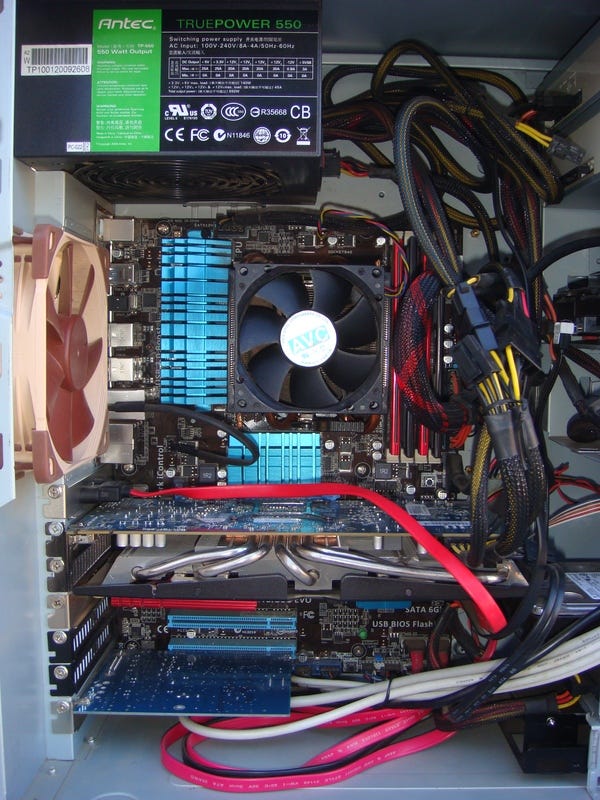
What are the two systems? Well the featured photo on this piece is a peek inside my actual main build box. It’s an ASUS M5A97 R2.0 motherboard, running an AMD FX-8150 processor (first iteration of the AMD “bulldozer” architecture that was often strongly criticised when it was released, but in my experience it is just fine). With 16GB RAM, a Radeon R9 270X display card, and a variety of hard drives (several SSDs and a couple of larger capacity spinners for more storage space) it is quite a capable system.

Now I bought this main build system about five or six years ago for a steal from a friend who upgraded to something newer and faster. He had it built custom back in 2013 and it was a pretty good low-to-mid-range system then, but it was only worth about a quarter what he paid (based on online prices) when I bought it off him a few years later, so I got a great deal. Then some upgrades such as more hard drives and the classic R9 270X (once again used, for a great price online) which is still a good performer for a 2013 card.

Being a nine year old system now it might even be described as “vintage” hardware yet it still performs brilliantly. For example, the recent versions of Blender 3.2.x build in about 45 minutes on this nine year old box. Quite a respectable time and faster than on Launchpad due builders there only having 8GB RAM, meaning parallelism of builds for new complex software often has to be limited now for Launchpad uploads. This 8GB limit I learned about from one of the main Launchpad tech support guys in response to a bug report I filed about build failures of certain complex software (including Blender).

Apart from the main build box, my main daily use computer is a great Dell Latitude E5520 unit. One of the better Dell systems that I’ve ever used or owned for sure that was retail for US$1,100 or so when new in late 2011. Once again I picked mine up used online for a steal about three years after it was released, paying only about $300 for a system in almost mint condition. About a quarter the new price once again, just as for my main build box. A few upgrades, such as putting in 16GB of RAM and a good fast high capacity SSD, and for one of the first generation i7 notebooks it is still a great performer.

All the 20,000 and more uploads to SavOS PPAs have been from these two rather humble systems, being a nine year old builder box and an 11 year old notebook! One does not need super fancy hardware to do good work in the computer (or any other) field. The intention is far more important, and my intention has been to create a better computer operating system not just for myself but for many others. With 20,000 users now of software builds tested on these “vintage” systems my intention has now manifested into reality.

A few more details about my hardware setup are needed for an understanding of the process that I use to do the actual building. To keep the amount of space required for the two systems to a minimum (I live in a tiny home!) the setup is centered on a single 27 inch screen, a classic Samsung SyncMaster P2770 released in early 2011. It’s one of the best looking LCDs that I’ve personally ever used, still with rich excellent colours and responsive for games (for a screen over 11 years old that’s pretty impressive!). Of course I picked it up used as well for a steal, from the same friend who sold me the main build box.

Using a simple single button HDMI switcher it is very easy for me to go back and forth between the two computers using the one screen. Each system has it’s own full size wired keyboard (I do not like wireless keyboards at all, too unreliable and unresponsive for a fast touch-typist such as myself) and also a good quality proper mouse (I simply cannot do “touch pads” on notebooks, so imprecise and annoying that they drive me crazy!). In other words, the notebook just sits off behind the monitor and my only usual daily physical interaction with it is pushing the power button in the morning to turn it on.

In actual practice I barely use the HDMI switcher, as the two systems are connected by a short gigabit ethernet hardline and I use X2Go as my preferred remote desktop solution. On a day when I do some hours of software building and packaging X2Go is running for the whole time. With a quick click on the taskbar (or a quick Alt-Tab) I’m looking at a full screen view of the build box. Then I can do what is needed to get the next build going: tweak the packaging as appropriate; do a diff between versions to see what changed; create a patch to fix a build failure; and then kick off the build!

Once the next build is going the X2Go screen can be minimised and I’m back on the notebook, which is the true “brains” of the operation. The notebook is where I initially download all source code and get the initial modifications to the packaging happening, and it’s what I use for almost all my web browsing. A good amount of my time in the SavOS mode is spent scouring Ubuntu and Debian websites to see what newer versions of this or that might be available, or similarly scouring the whole Internet for any info about bugs and build failures that I might be encountering, so as to get things fixed and working.

Using the two systems in tandem like this is highly efficient. As someone who values efficiency greatly this works well for me. My wife sometimes calls me “Mr. System” meaning that she knows I can pretty much systematise anything, including how I do all kinds of practical and work tasks such as: how I do work in the yard, for instance building a new fence for the chickens we have; how I optimally organise every square foot of space in the tiny home setup; and then of course how I do these computer and tech tasks.

Relative to the two systems and X2Go setup, having one doing building in the background while I am then getting another package ready in the foreground is key to the efficiency of it all. It’s not “multi-tasking” as such, which doesn’t actually really exist for humans in truth (we’re not at all capable of it without a huge reduction in efficiency, based on all studies that I’ve personally seen). It’s better described as highly efficient and organised task switching. Being aware of the progress of one task while working on another, and having a good instinctive sense of when to switch back and forth for most efficiency.

As a direct example of all this, while working on this post today I’ve also been switching to look at a new build of mpv (the great tiny media player, thanks to all who put in the effort developing it!) that I’m doing, then switching back to this writing. A short while ago the build kicked off, after a slight adjustment to the packaging for the latest source code. A minor modification to a patch was needed, and after that the build got underway. Now at this exact moment I just switched to look and the build succeeded. Hooray! So once I finish this writing and publish this post I’ll get on to uploading the new mpv builds.

In fact, that’s probably enough writing about my hardware setup and build process for today. Some say about 2,000 words is a good maximum for a piece like this and based on the LibreOffice Writer status bar it looks like I’m getting pretty close to that right now. It’s certainly enjoyable for me to finally be getting around to sharing a few of these details with everyone, and there will be more to come soon.

A special footnote to all those reading this piece who similarly value and reuse “vintage” tech that still works well and reliably: good on you! Humankind and planet Earth needs a whole lot more of such practice from a whole lot more people if there is to be a positive future for us all. May such true evolution of our collective consciousness happen, and soon!

SavOS project 3 year milestones: 20,000 uploads and 20,000 users

Three years ago the motive took hold of me to start sharing with other people updated software that I was spending time building on my computers. Having been using Ubuntu-based Linux as my main computer operating system for two and a half years at that point it felt like time for an expansion of these software building efforts, in terms of putting the work into the public domain.

Back in September 2018 the idea of using Ubuntu Launchpad for such work became of interest to me, and I actually did sign up for an account then. But I did not actually start using that account until my very first upload almost a year later. That was three years ago, specifically on 18 August 2019.

In case you don’t know about it, Launchpad is a rather excellent public service provided by Canonical, the company who publishes the free and open source Ubuntu operating system (an OS “distribution” running on the Linux “kernel” or system core). Anyone interested, and also willing to learn a few technical tricks about the process, can upload software builds to Launchpad for many others to then easily download and install on their own systems.

A strong motive to start leveraging my software building efforts by using the Launchpad service led to my first upload, which was of a program called Métamorphose created by Ianaré Sévi. It is an excellent file renaming tool with a very wide range of user configurable options and rules, allowing it to be used for complex renaming operations on even very large batches of files.

For a sometimes computer technician such as myself Métamorphose is a must have in the virtual toolbox. Yet there was a major bug when running the most recent known version with newer Ubuntu operating systems. As the creator of Métamorphose no longer had time to maintain the software I took it on to figure out a fix for the bug, which was also based on earlier investigation of that bug by someone else.

After applying my patch to fix the bug the program worked well for me on my own computers. The desire to share this fixed and working version is what then led to me creating my first ever “PPA” or Personal Package Archive on the Launchpad service, specifically for this program Métamorphose.

Jumping forward three years and wow, what a massive amount of time and effort I’ve ended up putting into the software builds available at now dozens of my own PPAs! Little did I know back in August 2019 that my initial upload of Métamorphose would lead to such a large amount of work on my part.

Earlier this month, August 2022, my total personal uploads to Launchpad surpassed the 20,000 mark. That means over 20,000 uploads of software builds based on the “recipes” personally tested by me on my own computers, with those recipes being known as “packaging” in the computer field.

To “package” software is to describe in precise detail the computer commands to carry out that will build or compile the program in question. Most people don’t want (and/or don’t know how) to do that, preferring just to download and install, which is where a service such as Launchpad makes it really easy.

Consider that a bicycle is made of many distinct components manufactured in many different places by different parties, and that all of those components aren’t generally much use on their own. However, once all of those parts are assembled correctly the bicycle created becomes very useful indeed. But most people would struggle to put together the bicycle from just the parts.

Similarly, computer software is usually comprised of a number of different components or modules. Often many, many such parts with large programs. All of which is not very useful to most people until it is built into the final “package” that can be easily downloaded and installed with a few clicks.

This process of building or packaging software is something I’ve done on and off since my early years, when I learned a little computer programming and then wanted to share the results with friends. To share the results is much easier when the program is compiled or packaged into the final form. Then it can easily be run with a simple typed command or mouse click, rather than having to load up the code in a special “development environment” to run it.

Over the past three years the initial motive to do a few uploads of new software packages grew and grew into the project that is now known as SavOS. In the beginning I had no idea that it would develop into something this big, as I mainly just wanted to share a few new and fixed builds of certain software with anyone “out there” who might find such to be useful.

However, in the very organic and unplanned process of doing more and more uploads of more and more software the vision of creating a better computer operating system then started to become clear to me. Thus, SavOS was born. The name “SavOS” is simply formed with the first three letters of my surname, combined with OS for operating system.

There is good precedent for such a name in the free and open source software (or FOSS) movement. Given that the name Linux is the first four letters of the first name of the creator, Linus Torvalds, along with “x” as an allusion to UNIX. With UNIX being the family of commercial operating systems for which GNU (“GNU’s not UNIX”) software plus Linux kernel gives a free alternative.

Also, Debian upon which Ubuntu is very directly based is comprised of two three letter names: Deb and Ian. Debra being the then girlfriend (later wife) of Ian Murdock at the time that he founded the Debian project in 1993. This history about both Linux and Debian aside, the SavOS name has a positive phonetic connotation that a couple of users have pointed out to me: Save Us!

Indeed. Save us from the apparently endless efforts of corporations to control us all, and save us from the proprietary limitations of corporate software, that wastes vast amounts of human time and energy and vast amounts of finite natural resources. All of which could certainly be put to far, far better uses!

So another milestone this month of August 2022 is that there are now around 20,000 active users of one or more of the PPAs that put together comprise the SavOS project. This is based on download statistics of one key package that is required by many of the other software programs at my PPAs (see the FFmpeg PPA, which is the most popular PPA of mine, for more details on the statistics).

That’s a couple of good notable milestones this month after three years of effort on the PPAs and SavOS project: 20,000 uploads and also 20,000 users! A pleasing synchronicity with the numbers, as does sometimes happen in life.

To give an idea of the significant amount of effort that I’ve put into this project since August 2019, my best estimate is that it’s at least 3,000 hours of work at this stage. As an average over three years it has been my literal half-time job!

This is about 20 hours per week of work in other words, or about 1,000 hours per year. Some weeks I put in more hours than that, some weeks less, but that’s a good and realistic estimate of my actual total time and effort that has gone into this SavOS project with all the many PPAs that are now available.

Having summarised above the amount of work it’s taken for the project to get to this point, now a brief request to the user base of my PPAs: if you are using any software that I am publishing and are financially able to donate some funds to support my work then please do so. It will help to keep the project alive, by helping to keep me alive (in terms of me eating and paying my bills).

In the past two years since I first put up links for donations on my Launchpad site there have now been 50 unique people who have directly contributed to the project (thank you all very much, no matter what amount you have given it has all helped me to survive!). Out of now 20,000 users these 50 donors equate to only about 0.25% of the total user base, to give some perspective.

A few people have generously contributed to support the project multiple times (big thanks!). Also, slightly more than half of the total amount of funds donated has come from just the top three donors (especially big thanks!). You can see the thanks on my main Launchpad site relative these top three donors.

This post here is a first step towards more regular communication on my part about the SavOS project, which will certainly help to bring more visibility and also more support. It’s time for me to let people get to know me and also this work better, which is very important for the longer term continuation of the project. This means I will definitely be putting more time into writing about it from here onward. Look out for more, coming soon!

SavOS logo (square)

A Year Later: Bringing the Enhancements to All

* Launchpad site referenced in this article: https://launchpad.net/~savoury1

Wow, looking at the date it is just over a year since the last post on this blog! The intention was to keep a somewhat steady flow of articles here, however, doing the work of bringing the same upgrades that I run on my own systems to all users of Ubuntu-based operating systems somehow became the priority.

Thus, only a few articles appeared and then nothing new for a year. It’s a matter of just making time for it (as with anything) and so I’ll endeavour to keep more writing going as well, it does help to balance the very technical hours. A commitment of at least quarter-time work (well over 500 hours now) over the past 13 months has resulted in what I will now describe here.

Over the past year or so a process unfolded of building an enhanced Ubuntu-based (and thus Debian-based, being the direct “parent” of Ubuntu) operating system for all who want that. “Enhanced” meaning many upgrades, backports, and newer packages and software than the default repositories for whichever “series” (ie. version, with Xenial, Bionic, and Focal being the three newest LTS “series”). This process of backporting and upgrading so many packages for older (and even new) Ubuntu-based systems was not a “planned” event, it simply became clear to me earlier this year that this is what I’d clearly undertaken to do.

The result is now a collection of Launchpad PPAs (Personal Package Archives) that provides quite comprehensive upgrade opportunities for those wanting such. Some of the key software applications that are available back to Xenial-era systems at my PPAs include: digiKam 7.1.0, GIMP 2.10.20, FFmpeg 4.3.1, VLC 3.0.11.1, and the recently added Blender 2.90 (and Blender 2.91 Alpha).

For the security conscious, GnuPG 2.2.23 is also available, as well as SSL 1.1.1g and various other related software. Then there are a number of themed PPAs, such as backports (various), encryption, graphics, multimedia, plus numerous build-related and development related supporting PPAs (which are required for builds of software found at many of the other PPAs).

It is a work-in-progress like any computer project, with newer upgrades and completion of some still unfinished areas of backporting yet to be done. However, there is a certain stability to the current set of packages and if the steady inflow of technical support requests and also bug reports (mainly missing dependencies for certain upgrades, in one or other of my PPAs) is anything to go by then there are certainly people “out there” who are already using and benefiting from this pretty comprehensive set of software upgrades that I’m providing for Ubuntu-based systems.

It “feels good” quite literally to be actually doing something helpful for other folk. After decades of supporting proprietary operating systems the switch to free software is proving very beneficial to my health altogether, amongst other things! The stress involved in constantly trying to undo the locks, limitations, and dumbing-down of modern proprietary operating systems was simply a waste of life. And the more the years progressed, the more most of my time with proprietary operating systems seemed to be about undoing all that locked-down dumbing-down of what could otherwise perhaps be useful software.

The total and utter contrast with free software is that I’m free to explore it as far as I want to go, free to contribute as much as I want to contribute without fear of violating the endless legal machinations of some evil big-tech corporation. And then people actually enjoy and appreciate the contributions too! What a “win-win” situation indeed. Having run “freed” computer operating systems for several years now there is no going back to the massively restricted, unpleasantness of corporate proprietary OSes.

Over 95% of my computer time is now in the enhanced Ubuntu environment that I’ve worked on this past year or so. Thus, less than 1 day in 20 of my computer time is with that awful, proprietary junk (and that 1 day in 20 is almost entirely relative paid work, I do need to eat and so far free software income is not covering that). Thank goodness! It actually does feel good to be writing this in LibreOffice Writer, and using Pale Moon (best web browser ever on the planet) to post to this little blog. All running in a rock-solid OS, which I’m now choosing to maintain a good portion of over this past year.

Some statistics can be fun: in the past year I’ve published almost 2,500 unique software packages on Launchpad. It’s 2,494 to be precise, according to the number of lines in my change-dir.lst file that allows me to “ccd” to any package that I’ve worked on.

On my own Xenial-era systems (Linux Mint 18.1 Serena is the basis, with the solid and fast GTK2 desktop) there are now about 1,700 discrete packages from my PPAs based on a quick “head count” in the /var/cache/apt/archives folder. Those Xenial-era systems are what I’ve built every single piece of software on before uploading, to make sure it works, is good and all is well. They are rock-solid systems, without question the most reliable OSes that I’ve ever used yet. There’s something to be said for that.

Next article will give some detail about the build processes that I use, including a custom wrapper script (“pbuilder-all”) that I created a year back and have improved a few times since. It makes the whole build process very simple and quick. A GitHub project for the build script and assorted build configuration files that I use will also be appearing in line with the next article. Hopefully (note to self: must make the time!) within the next week.

Upgraded to Xorg Xserver 1.20.5 today (in 2 minutes)

See https://savoury1.github.io/ubuntu-rolling/ for in-depth technical information
about the Ubuntu Enhanced installation referred to in this article.


All the background work to create the Ubuntu Enhanced (or “Rolling” Release) system paid off well for me today, as it has many times before. It took all of a couple of minutes to upgrade the Xorg Xserver X11 software (some 64 specific packages were upgraded) to the latest 1.20.5 version in Eoan (now in beta) on my custom Serena Enhanced installation.

There were some minor bugs in 1.20.4 (Disco, which is what was previously on my main system) that are supposed to be fixed in 1.20.5, so now that Eoan has that new version it was time to upgrade. By updating the package list files and running the “enhance-scripts-make” script, it was as easy as then typing “enhance-all” in the terminal to seamlessly install the very latest Ubuntu repository version of Xorg Xserver software.

In terms of the 2 minutes it took, there was about 30 seconds of opening three text files and doing global search and replace (changing the “D” prefix to “E” in three files for X11 related software). Then a couple seconds to type and run “enhance-scripts-make” to create the new enhance scripts. Next, running “enhance-all” took about a minute, including downloading 64 new Eoan packages and installing them. Then about 25-30 seconds to reboot the computer.

Voila! New Xorg Xserver 1.20.5 version and hopefully a few fixed bugs, while still on a Xenial-based system.

A Tale of Dock


In a vehicle, having easy access to the main controls, including on the steering column, the gear shift, and the dashboard, is critical to being able to control the vehicle effectively. It is also critical to safety and survival in a vehicle, as if you cannot turn on the headlights at night in the rain, for instance, then the chances of mishap would increase significantly.

With a graphical operating system on a computer, a key “dashboard control” is the dock. The place where you pin your most used application icons, so that you can quickly and easily launch the programs you need to launch to do the work you need to do. When the dock malfunctions or is buggy, it can be a big impediment to effectively using a computer, and it can be quite annoying.


Malfunctions of Dock

Some examples of possible dock malfunctions include these:

* You pin an icon to the dock, but when you load the application, it becomes another (unpinned) icon on the dock and doesn’t stay on the icon you clicked.

* You pin an icon to the dock, but when you click it there is no active icon for the application you just launched on the dock (including it’s own pinned icon, which is clearly not active), so if you’ve minimised the application you will need to use [Alt]+[Tab] to switch back to it.

* You load an application from the menu that is not pinned to the dock, and no icon at all appears for that application, once again resulting in the need to use [Alt]+[Tab] to switch back to it.

All of these malfunctions were indeed happening for me (and consistently so with particular applications) with the dock I’ve been using for years, which is MATE Dock Applet. Unfortunately, the applet hasn’t been maintained for those who still choose a GTK2 desktop. The stance of this writer and computer technician is clear relative to a GTK2 desktop – it is valuable as it is fast, light weight, not overly complex, relatively bug free, and really quite good. Other commentaries on this blog also clearly reflect this stance about a GTK2 desktop.

However, due “new features” (were they needed?) and “improvements” (for some, but not others) in the MATE Dock Applet, newer versions with many useful bugfixes were completely unusable on MATE 1.16 (GTK2) due to all those new features and improvements. Symptoms including no icons at all on the dock, or the dock spontaneously crashing happen consistently on GTK2 desktops with the newer applet versions. Thus, GTK2 desktop users have had to keep using buggy older versions if they happen to like MATE Dock Applet, yet this is a critical “dashboard control” for a computer!

This led me to take on the task of packaging a newer version of MATE Dock Applet than was available to GTK2 desktop users, such that people using such desktop environments can make use of this excellent (at least, if it was a bit more bug free!) dock. Big thanks to Robin Thompson for putting in all the hours to making this great dock applet a reality. Now that Robin no longer has time to maintain the applet it was clear that someone else needed to make a newer GTK2 version a reality.


Walking the Git Tree

All this git stuff is pretty new to me. A whole world of pushing and pulling, committing and reverting. What’s the git status? Let’s take a quick look at the git log. Hmm, what’s the current git diff situation? And so on, and on, and on. It’s a mini operating system in itself, the operating system of “code creation”.

There were about 80 commits in the tree since the version of MATE Dock Applet that I was using (0.78) on my fast and light weight GTK2 desktop. It was clear that the applet completely stops working at all with GTK2 after about version 0.85, so what commits happened around then? Well, some fancy HiDPI stuff for folk with super-expensive screens (which is not what the vast majority of computer users have, by the way). That sure looked suspicious.

Doing a hard reset of the git tree to any of the HiDPI commits and then building the applet gave the same result after installation: no dock icons at all. So one problem identified. Moving the tree further forwards in time and using a patch file to remove the code changes of those HiDPI commits gave a fully functional dock, also with bugfixes from newer commits than the not so useful HiDPI ones (at least not so useful for GTK2 desktop users with regular good ‘ol HD screens, you know, 1920 x 1080 pixels, quite a lot actually and do I really need more? No!).

Similar processes led to the necessary eradication of other “improvements” that were clearly focused on GTK3 desktops. This included changes to the way running applications were matched to the correct icon, the addition of a dark theme background (dark theme already works fine on older MATE Dock Applet versions, so what was this about?), and the use of a newer library than exists on Xenial 16.04 systems (ayatana) during the dock launch process (ie. initial desktop login) which was causing seconds of delay to the dock actually finishing loading.

It took about three days of work, so more than half a usual working week for sure, to walk that git tree sufficiently to nail down the various commits that were causing the issues and create patches to undo those commits. Yes, as a learner with all this, it might have taken longer than some “seasoned pro” git using developers. In any case, the end result is good and that counts for a lot.


Fully functional MATE Dock Applet on GTK2

Now when I load an application, I am confident it will have the correct icon, not add any spurious icons and that I can switch to it by clicking it. When I load an application from the menu, including obscure Java-based software that was not showing any icon on the dock, the icon appears and all is good.

A fully functional and relatively bug free dock is important in the use of a graphical desktop environment. Whatever modern operating system one uses, whether it is focused on penguins, fruit, or glass panes, the dock is a fast and easy way to launch applications and switch between them. The three days was worth it. And a lot of mistakes were made, yet a lot of learning also.

Cheers to the dock!

On Breaking the “Rules” with Computer Technology

A primary philosophy that has driven this writer for 30 years and more relative to computer technology is quite simple: make it work as well as possible for the actual end user (whether that is myself or someone I am providing technical support to, either professionally or privately). In many, many cases, to get this result (of the computer technology working as well as possible for the actual people who are actually using it) requires breaking the “rules” laid down by the various software vendors.

All of the big vendors (whether of proprietary or free software) have their various prescriptions and instructions as to how you are “supposed” to use the software they provide, whether it be an operating system or a specific software package. Yet, if one strictly adheres to these “rules” then it is quite often very limiting relative to actually getting the best possible results (in both functionality and performance) for the actual users.


An Illustrative Example

Back in the later 1990s a company where I was working paid for me to attend the full set of MCSE (Microsoft Certified Systems Engineer) courses. It was fine, but actually quite boring as I’d already learned essentially everything that my instructors were teaching in all the classes, by doing years of actual full-time work supporting the software in question.

More than that, the instructors were often insistent on a particular way of doing certain tasks being the “only” way or the “correct” way. Yet, due already extensive personal experience supporting the very server operating systems and software they were talking about, at times I knew what they were saying (straight from the Microsoft “rulebook”) to be incorrect.

A few times during these week-long quite boring courses (when I bothered to pull myself away from the network Quake game that I had got going at the back of the classroom with a few other renegades) I actually piped up to make specific corrections to what the instructor in question was teaching us. On each of these occasions the instructor immediately assumed me to simply be a troublemaker and corrected me.

Yet, at my insistence, the instructor did go away in the evening to check on what I was saying, only to return to the class the next day (in each of these instances) to explain that the way I said it was needing to be done was actually correct. This due to bugs and limitations in the software (and therefore due the “rulebook” not telling the full story).


Making the Computer Technology Work

This is one of hundreds of such examples that could be given where simply “following the manual” or “rules” is not sufficient to get the software actually working as well as it possibly can. The hundreds and hundreds of actual human beings that I’ve supported over now 30 years of professional computer work mainly want one thing: for the damn computer to do what they need it to do (and as well as it can) for their job or creative project or whatever it is!

So what’s the big deal if one has to fudge things, cobble things together in an unusual or unspecified (by the vendor) way, or even modify the system files in ways that the vendor says are not “allowed”? If that’s what needs to be done to actually make the computer work well, then that’s what needs to be done. There are many, many situations with computer technology where the “rulebook” is completely limiting and simply needs to be thrown out the window. If one truly wants the technology to work as well as possible, that is.

Yes, manuals can be very helpful in getting to know an operating system or piece of software. But, what manuals do not generally explain is all of the bugs and limitations in the software (that might otherwise contradict the various claims about features and capabilities of the software). In this era, it is extremely easy to get on the Internet, do a quick search, then read through all the descriptions of similar situations with whatever software you are using (or having problems with) and how it can be made to actually work better.


Be Willing to Allow Mistakes

A very significant part of learning for any of us is our mistakes. One needs to be quite willing to allow mistakes to happen and not “beat oneself up” about it overly much, especially with computer technology. Much of my own learning with computers has come about through the many mistakes I’ve made. Not on purpose, understand, but during the course of attempting to do a good and responsible job relative whatever the task at hand.

When one breaks something with the software on a computer and has the interest as well as aptitude to fix the situation, it is quite often a prime opportunity for learning a great deal. Much of which can never really take place if one always rigidly follows the “rulebook” as given by whichever vendor made the software in question.


No Operating System or Software is Perfect

There is truly no “perfect” operating system of software. It doesn’t exist! All software (and hardware!) has bugs and limitations. All. So a core matter is simply to determine what one is trying to accomplish with the tool called a “computer” so that one can choose what system and software will best serve that purpose.

A common theme on this blog is comparing a computer to a hammer. They are both tools to do work. In this early 21st century moment of history, it seems that there is an unbalanced amount of attention being placed on computer devices (most especially by the more affluent minority of the 7.7 billion human beings, so particularly those living in “first world” countries).

Computers don’t “resolve” or “solve” any fundamental problems for humankind any more than a hammer does. They are both simply tools that can be useful for certain jobs. Unfortunately, big tech firms with their huge economic dominance in this era are peddling their bug-ridden and spyware-infested devices and software with greater and greater vigor.

Such corporate entities are selling us the idea that “their” devices and software can somehow “make life better” or “make us happier” or whatever nonsense. However, it is all mainly just a con job to get as many of us as possible plugged into their spy-grid, so they can then gather and sell on as much information about every little detail of our lives as possible. Thus, we, the actual human beings using their devices and software, become the product.

This corporate trend in recent years means that switching to a Linux based operating system has become a more attractive option for many people. If what you are mainly doing includes things like surfing the Internet, watching videos online, sending a few emails, managing your photo collection, and typing some documents then Linux is an excellent choice. Yet, Linux based systems come with all their own problems and issues that are a little distinct from the issues with proprietary operating systems, though with quite a bit of crossover as well.

Thus, choose the operating system and software that works best for you, based on the work you are intending to do with your computer device. And be playful enough to break the “rules” prescribed by whoever provides the hardware and software you are using, if breaking those “rules” means that you get a better result in terms of functionality and performance from these expensive toys called computer devices that you have spent your money on!

Serena (Xenial) Enhanced (with 80% Bionic and 8% Cosmic)

Serena Enhanced
Serena (Xenial) Enhanced (with 80% Bionic and 8% Cosmic)

See https://savoury1.github.io/ubuntu-rolling/ for in-depth technical information
about the Serena (Xenial) Enhanced installation described in this article.

There is a movement afoot to “dumb down” all computer software and device apps and websites (and the rest of the technology world). Not to mention the same “dumbing down” that is happening in so many areas of our lives, consider TV news and the like, all of which is constantly telling us what to think, what to feel, what to do, and how to be.

To tell another how to be is arrogant and disrespectful of that other. Yet this phenomena of “important people” on the news or in corporations telling others “how to be” is going on all over the world at present, in every area of our lives. This includes the entire realm of computer software and computer devices, where we are all being forced to the corporate way of using our computers and devices, with the “paradigm” being the limiting of our options (even though we are the paying users of these toys!), removal of features, forcing us into one track, to do things one way.


Computer Desktop Colors

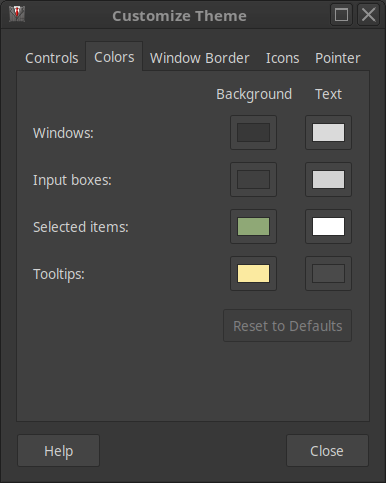
A key example of such dumbing down is in regards to choosing colors for the desktop of a computer operating system. In the free software world of Linux based distributions, for many years GTK2 (a GUI toolkit) based desktops allowed a simple way to change at least a handful of the fundamental colors of the desktop environment. With GTK2 a control panel appropriately titled “Colors” was available. Yet in “modern” GTK3 based desktops this basic color control panel feature was removed.

Serena Colors
Colors control panel as seen in Linux Mint Serena 18.1 MATE

People (like me) who mention real annoyance at the removal of this basic ability to customize the colors of the desktop are called “dinosaurs” or told they are “struggling with change”. These are nonsensical statements from developers driven to defend their dubious actions of creating “change for the sake of change”, even when such changes equal feature removal and the effective “dumbing down” of the software.

With Windows 3.0 (over 25 years ago) it was easy to customize colors and with all Windows versions through 7 it was still fairly easy. Then with Windows 8 the dumbing down process sped up, with barely any built-in means to customize the desktop colors any longer. This trend continued with Windows 10, which also has almost no built-in way to perform any real customization of the desktop colors.

Back to free software, with GTK3 (the newer and supposedly “improved” GUI toolkit) there are surely complex and detailed ways to “theme” the desktop (compared with GTK2), yet the simple ability for an ordinary user to change their desktop colors to those they find aesthetically pleasing has been bluntly removed. And based on reading of blogs by various GTK3 theme makers, the GTK3 themes seem to require a kind of arcane process to get them working, yet then the GTK developers often break much in GTK3 by frequently and significantly changing all kinds of syntax and code!


Free Software ≠ Corporate Software

Why is the free software movement following such negative and corporate trends? Why does the GTK team and other teams of programmers working on free software (ie. the Firefox development team, who bluntly removed support for years worth of excellent extensions in recent versions of Firefox) seemingly have similar corporate attitudes about how all this feature removal is somehow “good” and in the interests of the person using the computer?

Dumbing down is not in the interests of any of the people spoken to by this writer (and having done paid computer technical support of all kinds for over 25 years, people spoken to include hundreds and hundreds of end-users in various countries, so people with all kinds of backgrounds and varying technical aptitude). It is obvious that the Great Dumbing Down or GDD is in fact an intentional process that is being enforced by huge and very powerful global corporations, such as the tech giants.


Corporate Interests Limiting Options

It is easier for the tracking of our every computer action (meaning everything we do on our phones, tablets, “smart” watches, notebook & desktop computers and the rest) if there are only limited options available, such as with web browsers for instance. By brute force and no doubt huge bully (economic) pressure on all and sundry, Big Brother Google or BBG has enforced Chrome as the “de facto” web browser on the planet.

It serves the interests of big corporate players for most people to use a malware web browser such as Chrome from BBG. Tracking everything people are doing is even easier when you not only monitor their ISP traffic but see every link they go to straight from the web browser.


Free Software = Freedom to Choose

Relative free software and Linux-based distributions, due the GTK3 feature removal of color controls, GTK2 based desktops are a great choice for a fast and light weight alternative. Hence, MATE 1.16 is an excellent, simple, fast, and color customizable desktop environment. This makes Linux Mint Serena 18.1 MATE (released in early 2017, so now two and a half years “old”) a great choice for a Linux distribution with a GTK2 based desktop.

With that background, an experiment was undertaken to see how much of Serena (essentially Ubuntu 16.04 Xenial) could be upgraded with Bionic and also Cosmic packages (installed straight from the Ubuntu repositories, using the usual commands). This experiment was deemed important in the interests of having a Linux distribution with a GTK2 based desktop, but with most of the system being upgraded to much newer and more current components for up-to-date functionality, security and performance.

Over approximately nine months, with careful cross-referencing of package dependencies and related components on the Ubuntu packages web site, significant parts of Mint Serena 18.1 MATE were progressively and successfully upgraded with Bionic and Cosmic packages. This includes: the core C libraries; all kinds of security, networking, disk, audio, multimedia and system libraries (such as dbus and systemd); Gnome and GTK libraries; as well as KDE and Qt libraries.

All of these upgrades are with versions usually 2-3 years newer than the packages included with Xenial. Thus, this allows running a wide range of software that is 2-3 years newer than the versions that can be run on a straight Xenial-based system (such as Mint 18.1 Serena MATE).


Serena Enhanced – Ubuntu “Rolling Release”

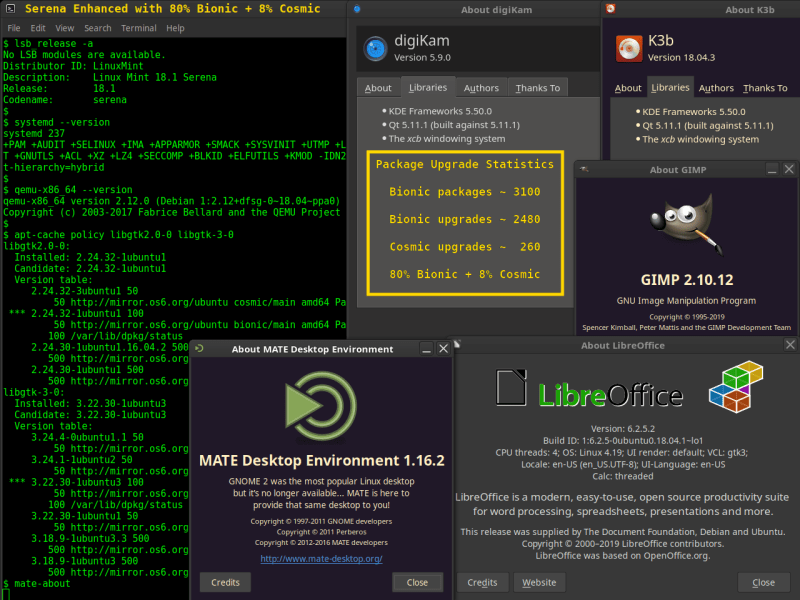
About 200 hours have been spent on this experiment thus far, so at least one month worth of full-time work spread over nine months. The result at present (mid-2019) is a Xenial-origin system (Mint Serena 18.1 MATE) with 80% Bionic and 8% Cosmic packages, leaving only 12% or 1/8th of the system as Xenial. So far this system has been extremely solid, fast, and flexible due all the newer components that allow running newer software, while being based on a light weight GTK2 based MATE desktop with colors!

This experiment has proven that even Ubuntu can be somewhat of a “rolling release” distribution, with the ability to upgrade many core system packages over time to newer versions from more recent Ubuntu releases. There is a certain modularity to any Linux distribution and the upgrade process resulted in careful categorization of packages in about three dozen discrete areas.

By installing newer packages in a specific order based on inter-dependencies between these few dozen package categories, a Xenial-based distribution can be reliably upgraded with 80% Bionic and 8% Cosmic packages. Of note is that KDE and Qt comprise most of the 8% Cosmic packages. To have these two particular components as new as possible was a key motive for the entire experiment, as numerous recent software packages require KDE and Qt libraries that are much newer than those provided in Xenial (eg. digiKam 5.9.0).

Given the amount of hours and effort spent on the project, it is time to release the findings to the public domain for the benefit of others who might want to create a similar “hybrid” Ubuntu-based system. The ability to run software created for both Xenial and also Bionic (and Cosmic) is a key advantage of this hybrid installation. Thus, “Serena Enhanced” is an example of a most flexible Ubuntu-based system.


Computers as a Tool for Real Work

In closing, the modern addiction to frequently revamping the look of computer desktop environments has no real purpose apart from “change for the sake of change”. A computer is a tool, like a hammer. Does one constantly change the appearance of a hammer, with new colors and fancy decorations? No, no one does that (at least no one this writer knows!).

A hammer is a tool with a purpose and when work requires that tool, doing the work is the key, not how the hammer looks. Similarly, a computer is a tool and when work requires that tool doing the work is the key, not having all kinds of fancy looks on the computer desktop. For many of us who use computers for real work, keeping the visual appearance of the desktop as simple and out of the way as possible (such as using the same set of preferred desktop colors one has used for years) is optimal.

Fixing bugs in existing software and making existing features work better is unfortunately often secondary in the current information technology scene to the constant drive for new “features” and “change for the sake of change”. Sure, it’s not as glamorous to fix bugs and simply improve what is already in place, but this is actually far more important for almost all computer users (that this writer has ever spoken to) than the constant changes being made to existing software.

Perhaps when human kind moves on from being as besotted with superficial appearances altogether (such as having the latest whizz-bang fancy phone, with the latest time and energy wasting animation effects on every little action) we will actually get down to honing these computer tools to do real work with less silly fluff. It would indeed save fast-dwindling and finite planetary resources to tone down all that special effects nonsense on modern computer devices, all of which consumes electricity and (unless it is from renewable sources) uses physical fuel. To keep the visual appearances simple while providing powerful tools to do real work is without question a more efficient and optimal paradigm.