
One of the users of my PPAs wrote me a few months ago with a good suggestion: share a few details of my hardware setup and the software building process that I follow. Give people some insight into the workings of the SavOS “operation” as such. So today I am (at last) getting to doing that (and thank you Eric H. for the suggestion!).
As someone who always does his best to reuse and not be wasteful I have (almost) always purchased my tech items used (or “pre-loved” to use another term that I like). There are a few big advantages to this as far as I see it: much better prices due it not being new and the “latest, greatest” hardware (the newest tech is always hugely overpriced in my opinion); used hardware is at least somewhat tried and tested, so DOA (“dead on arrival”) as can happen with any brand new tech is unlikely; and help our planet by being part of the process of recycling and reusing.
Even when I had a good income doing high end server engineer work I still bought my tech used. An example is the classic Dell Dimension D300 system that I purchased in 1997 when I was working for a startup web design firm as their systems engineer. That system was “ex demo” meaning it had been tested by some company or other but not purchased, and so I got it at a good discount due it being used for one or two weeks only (though it is shocking to recall how much I still paid then, compared hardware prices nowadays!).
That classic D300 with Pentium II 300MHz processor still runs fine to this day. A 25 year old computer now. It did such solid service for me too back in the day, five years or so before I upgraded to a newer box. In that five years there were about three years of tech work in the burgeoning web industry, and then for a couple of years my main work was as a self-employed musician. Even the humble Pentium II 300MHz worked great for some quite high-end real-time multi-track recording work that I was doing!
This background is to help everyone understand that my tech equipment is generally pretty humble, not the “whiz bang” newest stuff out there at all. The two computer systems that I use to do all the software building for SavOS PPAs are exactly such humble tools, but they are rock solid reliable hardware. Such reliability is invaluable to me in this world where so much computer hardware can be not so reliable.
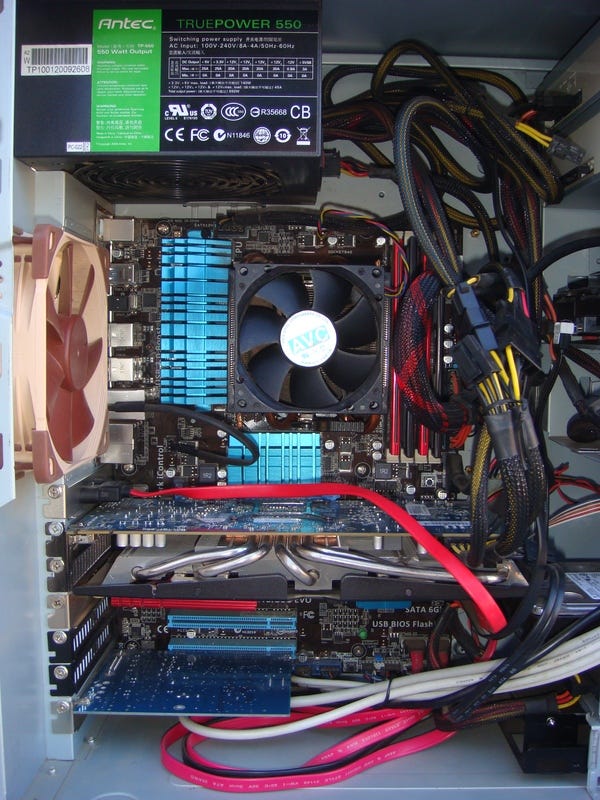
What are the two systems? Well the featured photo on this piece is a peek inside my actual main build box. It’s an ASUS M5A97 R2.0 motherboard, running an AMD FX-8150 processor (first iteration of the AMD “bulldozer” architecture that was often strongly criticised when it was released, but in my experience it is just fine). With 16GB RAM, a Radeon R9 270X display card, and a variety of hard drives (several SSDs and a couple of larger capacity spinners for more storage space) it is quite a capable system.
Now I bought this main build system about five or six years ago for a steal from a friend who upgraded to something newer and faster. He had it built custom back in 2013 and it was a pretty good low-to-mid-range system then, but it was only worth about a quarter what he paid (based on online prices) when I bought it off him a few years later, so I got a great deal. Then some upgrades such as more hard drives and the classic R9 270X (once again used, for a great price online) which is still a good performer for a 2013 card.
Being a nine year old system now it might even be described as “vintage” hardware yet it still performs brilliantly. For example, the recent versions of Blender 3.2.x build in about 45 minutes on this nine year old box. Quite a respectable time and faster than on Launchpad due builders there only having 8GB RAM, meaning parallelism of builds for new complex software often has to be limited now for Launchpad uploads. This 8GB limit I learned about from one of the main Launchpad tech support guys in response to a bug report I filed about build failures of certain complex software (including Blender).
Apart from the main build box, my main daily use computer is a great Dell Latitude E5520 unit. One of the better Dell systems that I’ve ever used or owned for sure that was retail for US$1,100 or so when new in late 2011. Once again I picked mine up used online for a steal about three years after it was released, paying only about $300 for a system in almost mint condition. About a quarter the new price once again, just as for my main build box. A few upgrades, such as putting in 16GB of RAM and a good fast high capacity SSD, and for one of the first generation i7 notebooks it is still a great performer.
All the 20,000 and more uploads to SavOS PPAs have been from these two rather humble systems, being a nine year old builder box and an 11 year old notebook! One does not need super fancy hardware to do good work in the computer (or any other) field. The intention is far more important, and my intention has been to create a better computer operating system not just for myself but for many others. With 20,000 users now of software builds tested on these “vintage” systems my intention has now manifested into reality.
A few more details about my hardware setup are needed for an understanding of the process that I use to do the actual building. To keep the amount of space required for the two systems to a minimum (I live in a tiny home!) the setup is centered on a single 27 inch screen, a classic Samsung SyncMaster P2770 released in early 2011. It’s one of the best looking LCDs that I’ve personally ever used, still with rich excellent colours and responsive for games (for a screen over 11 years old that’s pretty impressive!). Of course I picked it up used as well for a steal, from the same friend who sold me the main build box.
Using a simple single button HDMI switcher it is very easy for me to go back and forth between the two computers using the one screen. Each system has it’s own full size wired keyboard (I do not like wireless keyboards at all, too unreliable and unresponsive for a fast touch-typist such as myself) and also a good quality proper mouse (I simply cannot do “touch pads” on notebooks, so imprecise and annoying that they drive me crazy!). In other words, the notebook just sits off behind the monitor and my only usual daily physical interaction with it is pushing the power button in the morning to turn it on.
In actual practice I barely use the HDMI switcher, as the two systems are connected by a short gigabit ethernet hardline and I use X2Go as my preferred remote desktop solution. On a day when I do some hours of software building and packaging X2Go is running for the whole time. With a quick click on the taskbar (or a quick Alt-Tab) I’m looking at a full screen view of the build box. Then I can do what is needed to get the next build going: tweak the packaging as appropriate; do a diff between versions to see what changed; create a patch to fix a build failure; and then kick off the build!
Once the next build is going the X2Go screen can be minimised and I’m back on the notebook, which is the true “brains” of the operation. The notebook is where I initially download all source code and get the initial modifications to the packaging happening, and it’s what I use for almost all my web browsing. A good amount of my time in the SavOS mode is spent scouring Ubuntu and Debian websites to see what newer versions of this or that might be available, or similarly scouring the whole Internet for any info about bugs and build failures that I might be encountering, so as to get things fixed and working.
Using the two systems in tandem like this is highly efficient. As someone who values efficiency greatly this works well for me. My wife sometimes calls me “Mr. System” meaning that she knows I can pretty much systematise anything, including how I do all kinds of practical and work tasks such as: how I do work in the yard, for instance building a new fence for the chickens we have; how I optimally organise every square foot of space in the tiny home setup; and then of course how I do these computer and tech tasks.
Relative to the two systems and X2Go setup, having one doing building in the background while I am then getting another package ready in the foreground is key to the efficiency of it all. It’s not “multi-tasking” as such, which doesn’t actually really exist for humans in truth (we’re not at all capable of it without a huge reduction in efficiency, based on all studies that I’ve personally seen). It’s better described as highly efficient and organised task switching. Being aware of the progress of one task while working on another, and having a good instinctive sense of when to switch back and forth for most efficiency.
As a direct example of all this, while working on this post today I’ve also been switching to look at a new build of mpv (the great tiny media player, thanks to all who put in the effort developing it!) that I’m doing, then switching back to this writing. A short while ago the build kicked off, after a slight adjustment to the packaging for the latest source code. A minor modification to a patch was needed, and after that the build got underway. Now at this exact moment I just switched to look and the build succeeded. Hooray! So once I finish this writing and publish this post I’ll get on to uploading the new mpv builds.
In fact, that’s probably enough writing about my hardware setup and build process for today. Some say about 2,000 words is a good maximum for a piece like this and based on the LibreOffice Writer status bar it looks like I’m getting pretty close to that right now. It’s certainly enjoyable for me to finally be getting around to sharing a few of these details with everyone, and there will be more to come soon.
A special footnote to all those reading this piece who similarly value and reuse “vintage” tech that still works well and reliably: good on you! Humankind and planet Earth needs a whole lot more of such practice from a whole lot more people if there is to be a positive future for us all. May such true evolution of our collective consciousness happen, and soon!
 Savoury Tech