
See https://savoury1.github.io/ubuntu-rolling/ for in-depth technical information
about the Serena (Xenial) Enhanced installation described in this article.
There is a movement afoot to “dumb down” all computer software and device apps and websites (and the rest of the technology world). Not to mention the same “dumbing down” that is happening in so many areas of our lives, consider TV news and the like, all of which is constantly telling us what to think, what to feel, what to do, and how to be.
To tell another how to be is arrogant and disrespectful of that other. Yet this phenomena of “important people” on the news or in corporations telling others “how to be” is going on all over the world at present, in every area of our lives. This includes the entire realm of computer software and computer devices, where we are all being forced to the corporate way of using our computers and devices, with the “paradigm” being the limiting of our options (even though we are the paying users of these toys!), removal of features, forcing us into one track, to do things one way.
Computer Desktop Colors
A key example of such dumbing down is in regards to choosing colors for the desktop of a computer operating system. In the free software world of Linux based distributions, for many years GTK2 (a GUI toolkit) based desktops allowed a simple way to change at least a handful of the fundamental colors of the desktop environment. With GTK2 a control panel appropriately titled “Colors” was available. Yet in “modern” GTK3 based desktops this basic color control panel feature was removed.
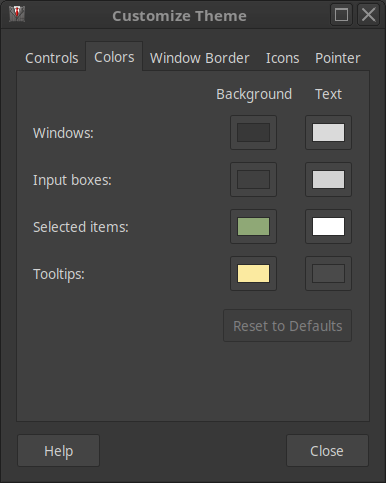
People (like me) who mention real annoyance at the removal of this basic ability to customize the colors of the desktop are called “dinosaurs” or told they are “struggling with change”. These are nonsensical statements from developers driven to defend their dubious actions of creating “change for the sake of change”, even when such changes equal feature removal and the effective “dumbing down” of the software.
With Windows 3.0 (over 25 years ago) it was easy to customize colors and with all Windows versions through 7 it was still fairly easy. Then with Windows 8 the dumbing down process sped up, with barely any built-in means to customize the desktop colors any longer. This trend continued with Windows 10, which also has almost no built-in way to perform any real customization of the desktop colors.
Back to free software, with GTK3 (the newer and supposedly “improved” GUI toolkit) there are surely complex and detailed ways to “theme” the desktop (compared with GTK2), yet the simple ability for an ordinary user to change their desktop colors to those they find aesthetically pleasing has been bluntly removed. And based on reading of blogs by various GTK3 theme makers, the GTK3 themes seem to require a kind of arcane process to get them working, yet then the GTK developers often break much in GTK3 by frequently and significantly changing all kinds of syntax and code!
Free Software ≠ Corporate Software
Why is the free software movement following such negative and corporate trends? Why does the GTK team and other teams of programmers working on free software (ie. the Firefox development team, who bluntly removed support for years worth of excellent extensions in recent versions of Firefox) seemingly have similar corporate attitudes about how all this feature removal is somehow “good” and in the interests of the person using the computer?
Dumbing down is not in the interests of any of the people spoken to by this writer (and having done paid computer technical support of all kinds for over 25 years, people spoken to include hundreds and hundreds of end-users in various countries, so people with all kinds of backgrounds and varying technical aptitude). It is obvious that the Great Dumbing Down or GDD is in fact an intentional process that is being enforced by huge and very powerful global corporations, such as the tech giants.
Corporate Interests Limiting Options
It is easier for the tracking of our every computer action (meaning everything we do on our phones, tablets, “smart” watches, notebook & desktop computers and the rest) if there are only limited options available, such as with web browsers for instance. By brute force and no doubt huge bully (economic) pressure on all and sundry, Big Brother Google or BBG has enforced Chrome as the “de facto” web browser on the planet.
It serves the interests of big corporate players for most people to use a malware web browser such as Chrome from BBG. Tracking everything people are doing is even easier when you not only monitor their ISP traffic but see every link they go to straight from the web browser.
Free Software = Freedom to Choose
Relative free software and Linux-based distributions, due the GTK3 feature removal of color controls, GTK2 based desktops are a great choice for a fast and light weight alternative. Hence, MATE 1.16 is an excellent, simple, fast, and color customizable desktop environment. This makes Linux Mint Serena 18.1 MATE (released in early 2017, so now two and a half years “old”) a great choice for a Linux distribution with a GTK2 based desktop.
With that background, an experiment was undertaken to see how much of Serena (essentially Ubuntu 16.04 Xenial) could be upgraded with Bionic and also Cosmic packages (installed straight from the Ubuntu repositories, using the usual commands). This experiment was deemed important in the interests of having a Linux distribution with a GTK2 based desktop, but with most of the system being upgraded to much newer and more current components for up-to-date functionality, security and performance.
Over approximately nine months, with careful cross-referencing of package dependencies and related components on the Ubuntu packages web site, significant parts of Mint Serena 18.1 MATE were progressively and successfully upgraded with Bionic and Cosmic packages. This includes: the core C libraries; all kinds of security, networking, disk, audio, multimedia and system libraries (such as dbus and systemd); Gnome and GTK libraries; as well as KDE and Qt libraries.
All of these upgrades are with versions usually 2-3 years newer than the packages included with Xenial. Thus, this allows running a wide range of software that is 2-3 years newer than the versions that can be run on a straight Xenial-based system (such as Mint 18.1 Serena MATE).
Serena Enhanced – Ubuntu “Rolling Release”
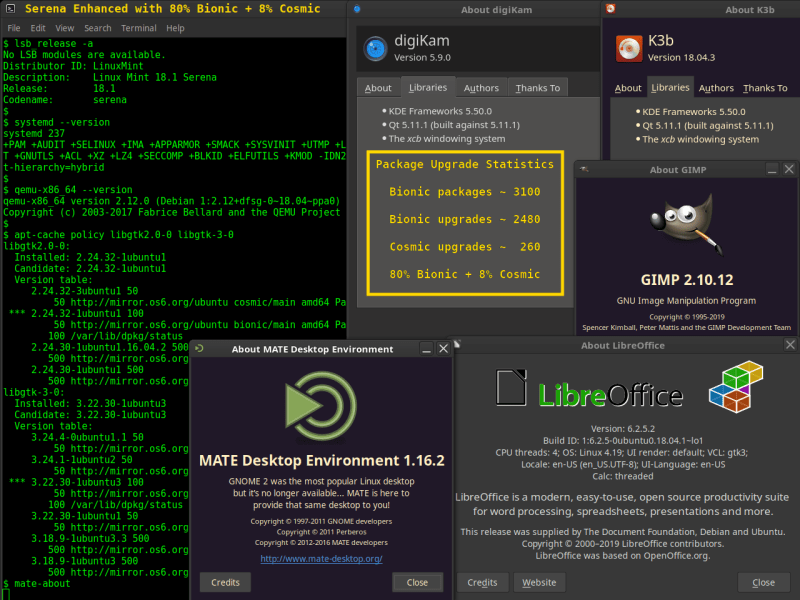
About 200 hours have been spent on this experiment thus far, so at least one month worth of full-time work spread over nine months. The result at present (mid-2019) is a Xenial-origin system (Mint Serena 18.1 MATE) with 80% Bionic and 8% Cosmic packages, leaving only 12% or 1/8th of the system as Xenial. So far this system has been extremely solid, fast, and flexible due all the newer components that allow running newer software, while being based on a light weight GTK2 based MATE desktop with colors!
This experiment has proven that even Ubuntu can be somewhat of a “rolling release” distribution, with the ability to upgrade many core system packages over time to newer versions from more recent Ubuntu releases. There is a certain modularity to any Linux distribution and the upgrade process resulted in careful categorization of packages in about three dozen discrete areas.
By installing newer packages in a specific order based on inter-dependencies between these few dozen package categories, a Xenial-based distribution can be reliably upgraded with 80% Bionic and 8% Cosmic packages. Of note is that KDE and Qt comprise most of the 8% Cosmic packages. To have these two particular components as new as possible was a key motive for the entire experiment, as numerous recent software packages require KDE and Qt libraries that are much newer than those provided in Xenial (eg. digiKam 5.9.0).
Given the amount of hours and effort spent on the project, it is time to release the findings to the public domain for the benefit of others who might want to create a similar “hybrid” Ubuntu-based system. The ability to run software created for both Xenial and also Bionic (and Cosmic) is a key advantage of this hybrid installation. Thus, “Serena Enhanced” is an example of a most flexible Ubuntu-based system.
Computers as a Tool for Real Work
In closing, the modern addiction to frequently revamping the look of computer desktop environments has no real purpose apart from “change for the sake of change”. A computer is a tool, like a hammer. Does one constantly change the appearance of a hammer, with new colors and fancy decorations? No, no one does that (at least no one this writer knows!).
A hammer is a tool with a purpose and when work requires that tool, doing the work is the key, not how the hammer looks. Similarly, a computer is a tool and when work requires that tool doing the work is the key, not having all kinds of fancy looks on the computer desktop. For many of us who use computers for real work, keeping the visual appearance of the desktop as simple and out of the way as possible (such as using the same set of preferred desktop colors one has used for years) is optimal.
Fixing bugs in existing software and making existing features work better is unfortunately often secondary in the current information technology scene to the constant drive for new “features” and “change for the sake of change”. Sure, it’s not as glamorous to fix bugs and simply improve what is already in place, but this is actually far more important for almost all computer users (that this writer has ever spoken to) than the constant changes being made to existing software.
Perhaps when human kind moves on from being as besotted with superficial appearances altogether (such as having the latest whizz-bang fancy phone, with the latest time and energy wasting animation effects on every little action) we will actually get down to honing these computer tools to do real work with less silly fluff. It would indeed save fast-dwindling and finite planetary resources to tone down all that special effects nonsense on modern computer devices, all of which consumes electricity and (unless it is from renewable sources) uses physical fuel. To keep the visual appearances simple while providing powerful tools to do real work is without question a more efficient and optimal paradigm.
 Savoury Tech